intake · Product help
Publish, install, and operate a website intake form
Launch a published intake form on WordPress, Wix, Squarespace, or HTML, run a safe test, and review inquiries.
SeniorPath Product & Compliance · Product version 2026.09
Source checked · Replit Agent repository source inspection; not human, legal, provider, or publication approval.
This is general product guidance, not a view of your account. Confirm permissions and current facts in your workspace before acting. Do not enter private client information here.
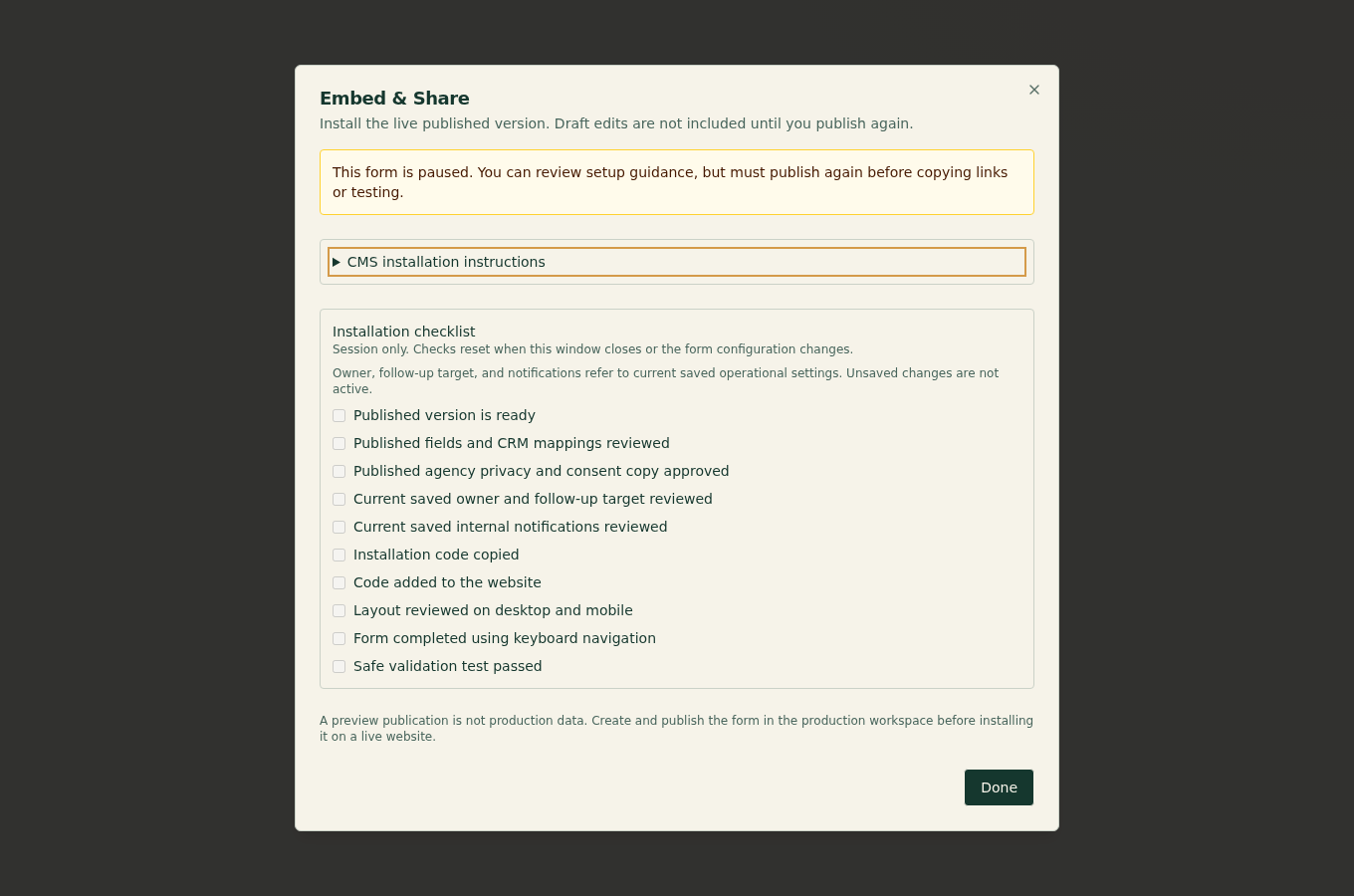
Prerequisites and role: Solo and Agency intake-form editing requires an owner, admin, or advisor; installing on a third-party site additionally requires the site owner's publishing permission. Have approved consent text, routing owner, and follow-up target ready.
Steps: 1. Open Marketing → Intake, review form fields, consent, mapping, routing and notifications, then publish. A draft is editable but is not a live public form. Publishing creates the current immutable published version and makes its generated hosted URL and embed code available; later draft edits do not change that live version until you publish again. Pausing makes the public form unavailable without erasing its inquiries; archiving removes it from normal active use. Use the exact URL or embed code shown for the published form. Do not substitute a preview or development URL. 2. Install the generated code on the authorized site, or link the hosted form if embedding is restricted. 3. Run the signed-in validation-only test with dummy data; separately inspect the real site with its owner's permission. 4. Open Submissions and review accepted inquiries before linking or creating clients.
Expected result: the published version is accessible through its generated link or authorized embed and actual accepted inquiries await review; the safe test creates no inquiry.
Exceptions and recovery: if validation fails, correct the fields and retest; if the builder blocks scripts, use the hosted link. Pause the form when consent, routing or installation is unsafe. Check the published version and inquiry history before retrying any real submission.
Choose an installation: • WordPress: use a Custom HTML block for the supplied embed code. WordPress.com and managed sites can restrict scripts by plan, plugin, or administrator policy. • Wix: use an Embed Code / Embed HTML element and size its container for desktop and mobile. Site roles and plan or domain restrictions can limit custom embeds. • Squarespace: use a Code block that allows the supplied code. Some plans, page types, and site security settings restrict scripts. • Generic HTML: place the supplied embed snippet in the authorized page markup without changing its publication identifier or loader URL. You need permission to edit and publish the intended website page. Preview and draft modes in a site builder are not the live site. If scripts are blocked, permissions are unavailable, or the plan does not allow an embed, link a button or navigation item to the generated SeniorPath-hosted form instead. SeniorPath cannot guarantee that every builder, theme, consent manager, or plan supports embedding.
Launch checklist: review the approved fields and mappings; agency privacy and consent wording; default owner and follow-up target; notification settings; and the current published version. Then inspect desktop and mobile layout and complete every field using the keyboard. Run only the signed-in setup screen's validation-only test against the current published version, using clearly dummy data. That safe test exercises the production renderer and validation but creates no inquiry, client, referral, work alert, email, or provider call. It does not visit, crawl, submit through, or certify the real external website. Checklist marks are session-only working notes: closing setup or changing form/publication, owner, due target, or notification configuration resets them. They are not a saved launch certification.
Operate review-first: real accepted submissions appear as inquiries. Open and review the original answers, consent, owner, due target, delivery state, and possible duplicates before creating a client or explicitly linking the inquiry to an existing client. Linking does not overwrite the existing client. Use filters and pagination to review older inquiry history, including inquiries for paused or archived forms. Do not infer that a missing or partial attribution value proves where a person came from: attribution depends on the browser and URL context supplied, and can be absent or stripped by privacy controls, redirects, or embedding.
Notifications are internal operating alerts configured for selected agency recipients; they are not a reply to the family and are not proof that an advisor contacted the inquirer. Any personal follow-up email is a separate, deliberate send from the authorized advisor's connected Gmail or Outlook mailbox. SeniorPath selectively retains supported record-linked messages and relevant replies for authorized teammates; it does not import the whole inbox.
Operator duty: obtain the website owner's authorization, confirm the correct site and page, preserve the generated code, approve privacy and consent language, assign follow-up ownership, and review each inquiry before conversion, linking, or personal contact. If installation or validation fails, leave the form paused or use the hosted link until an authorized site administrator resolves the restriction.
Family visibility: visitors see the currently published form, its privacy and consent text, and its confirmation state. Drafts, checklist marks, routing, notification settings, inquiry review, duplicate suggestions, client records, and internal history remain private.
Reverify: repeat the session checklist after every publication or change to owner, follow-up target, notification configuration, website placement, CMS theme, plan, domain, or consent tooling. Recheck the live website separately with the website owner's authorization; a SeniorPath validation-only result is not external-site verification.
Was this article useful?
Feedback collection is currently unavailable pending privacy review. Do not enter client information here. This feedback is not a support request.