mobile · Product help
Use the Field Companion safely
Handle supported field tasks on mobile while protecting case data and checking freshness.
SeniorPath Product & Compliance · Product version 2026.09
Source checked · Replit Agent repository source inspection; not human, legal, provider, or publication approval.
This is general product guidance, not a view of your account. Confirm permissions and current facts in your workspace before acting. Do not enter private client information here.
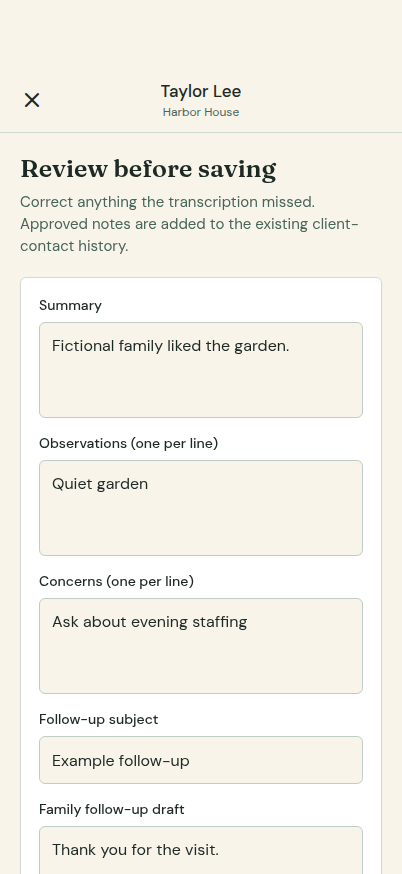
Prerequisites and role: use an authorized signed-in member and supported mobile installation with connectivity. Solo and Agency core case access applies; tour note and manual family-contact writes require owner/admin/advisor. The intended tour must exist and the operator must check in before debrief recording or approval.
Steps: 1. Open Today and verify the agency, client, partner or tour against current main-app information. 2. Log a partner visit or open the correct tour and Check in before audio capture. 3. Record/upload the tour debrief; inspect its transcript, summary, observations, concerns and family follow-up draft, correct unsupported claims, then explicitly approve. 4. Confirm the approved status and any follow-up in the main app before treating it as completed.
Expected result: a reviewed debrief is linked to the checked-in tour; neither a draft nor audio upload automatically sends a family message or satisfies a compliance check.
Exceptions and recovery: if check-in is absent the debrief upload/processing or approval is rejected; check in to the correct tour first. If upload or transcription fails, inspect status and connectivity before retrying, and do not rely on a stale offline view. If approval is unavailable, use the main app for authorized follow-up instead of claiming a draft was approved.
The Field Companion's shipped scope includes the Today briefing; client, partner, and tour lists and details; partner visit logging; and tour check-in followed by audio capture and a debrief draft that the operator reviews and approves. It does not expose every main-app workflow. Available records and actions depend on the signed-in member's role, and network-dependent work may be unavailable or stale when connectivity is interrupted.
Operator duty: check the intended agency and record, protect the device, review partner visit entries, and review and approve the tour debrief draft before relying on it. Return to the main app for unsupported work; do not assume an upload or update completed during poor connectivity.
Family visibility: using the companion does not make internal data family-visible. Families see only information deliberately published or delivered through family-facing workflows.
Reverify: refresh before acting on time-sensitive case, facility, tour, or compliance data, especially after connectivity gaps or work by another team member. An approved debrief is not fresh registry evidence, a completed required disclosure, or a current facility availability check; verify those separately close to referral.
Was this article useful?
Feedback collection is currently unavailable pending privacy review. Do not enter client information here. This feedback is not a support request.